
ISP Billing Automation with n8n: A Step-By-Step Guide
Stop losing revenue to late payments. Learn how to build a complete ISP billing flow using n8n automation, from due date reminders to message dispatch.
- n8n automation
- ISP automation
- financial automation
- billing flow
- ERP integration

The Hidden Cost of Manual Collections for ISPs
Are you tired of your support team acting as debt collectors? Every regional ISP owner knows that dealing with late payments is one of the biggest bottlenecks for growth. When your team spends hours manually checking the ERP and sending WhatsApp messages, they are not focusing on what truly matters: expanding your network and improving customer service.
Implementing a structured billing flow is not just an operational upgrade; it is a survival strategy. Cash flow predictability allows you to invest in better infrastructure. However, relying on human memory to send every single due date reminder is a recipe for lost revenue and high default rates.
This is where n8n automation changes the game completely. By connecting your ERP directly to your communication channels, you can build a relentless, error-free system. In this guide, we will walk you through the exact steps to implement complete financial automation for your ISP.
Defining Your ISP Billing Schedule
Before touching any software, you need a strategy. A billing schedule (often called a régua de cobrança) is the timeline of actions your system will take based on a customer's invoice due date. A well-designed schedule prevents churn while maximizing default collection efficiency.
You cannot treat a customer who is one day late the same way you treat someone who is fifteen days late. Personalization is key. Here is a highly effective billing schedule structure used by top-performing regional ISPs:
| Timeline | Action Type | Communication Goal |
|---|---|---|
| 3 Days Before | Gentle Reminder | Send the PIX code or barcode early to prevent forgetfulness. |
| Day 0 (Due Date) | Due Date Reminder | Urgent but friendly notification that the invoice expires today. |
| 3 Days After | Late Payment Notice | Inform about potential service reduction and offer a quick payment link. |
| 15 Days After | Suspension Warning | Firm default collection notice prior to total connection block. |
With this logic mapped out, your goal is to translate these business rules into a digital workflow. Let's look at how to build this engine.

Step-by-Step: Building Your Billing Flow in n8n
n8n is a powerful, node-based automation tool that allows you to connect APIs without writing complex code. To automate your ISP collections, we will build a flow that triggers daily, consults your ERP, filters the data, and executes the message dispatch.
Step 1: The Trigger (Schedule Node)
Every automation needs a starting point. For a billing flow, time is the trigger. You will use the Schedule Trigger Node in n8n.
- Set the node to run every day at a specific time (e.g., 8:30 AM).
- Pro tip: Avoid sending financial messages outside of business hours to maintain a professional image and comply with local communication laws.
Step 2: Querying the ERP for Defaults
Next, n8n needs to know who owes you money. You will use the HTTP Request Node to pull data from your ISP management software.
If you use popular systems like IXC or SGP, you will authenticate using your API token. You configure the node to request a list of all invoices that match your billing schedule criteria (e.g., invoices expiring today, or invoices 3 days overdue). If you need help understanding API queries, check out our guide on how to Automate IXC Debt Inquiries.
Step 3: Iterating Through the Data
Your ERP will return a large JSON array containing dozens or hundreds of customers. You cannot send one massive message to everyone. You must split this data.
Use the Item Lists Node (or the Loop node in newer n8n versions) to isolate each customer. This ensures that the subsequent nodes process one invoice at a time, allowing for highly personalized messages.
Step 4: The Logic Switch
Not all invoices require the same message. You will add a Switch Node to route the customer based on their specific situation.
- Path A: If the invoice expires today, route to the friendly reminder template.
- Path B: If the invoice is 5 days late, route to the urgent default collection template.
This dynamic routing is the core of true financial automation. It ensures your communication always matches the customer's exact context.
Step 5: Message Dispatch (WhatsApp Integration)
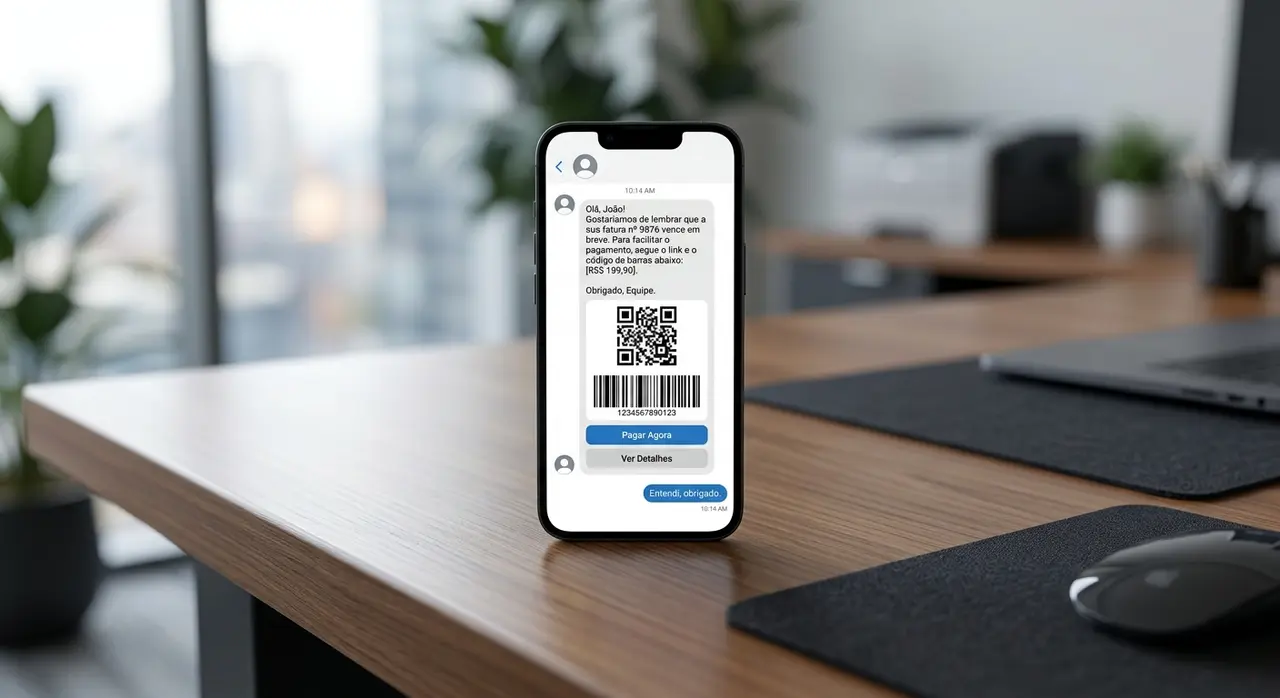
Now comes the most critical part: reaching the customer. Email is often ignored, but WhatsApp has a near 100% open rate. You will use another HTTP Request Node (or a dedicated WhatsApp Business API node) to handle the message dispatch.
Your payload should include dynamic variables. Instead of a generic "Dear customer", use {{$json.customer_name}}. Always include the PIX copy-and-paste code or a direct payment link to remove any friction. Making it easy to pay is the fastest way to reduce defaults.
Step 6: Return Logging in the ERP
A fatal mistake many ISPs make is sending the message and forgetting about it. If a customer calls your support desk five minutes later, your human agents need to know that an automated message was just sent.
To solve this, add a final HTTP Request Node that sends a POST request back to your ERP. This node should log an interaction in the customer's CRM profile, stating: "Automated due date reminder sent via WhatsApp on [Date]". For more advanced setups, you can explore comprehensive n8n automation flows.
Best Practices for High-Converting Messages
The technology behind n8n automation is useless if your copywriting pushes customers away. Your tone should always be helpful, not accusatory.
For a due date reminder, try this approach: "Hi [Name]! Just a quick reminder that your internet invoice for this month is due today. To make it easy, here is your PIX code: [Code]. Have a great day!"
For late payments, maintain respect but add urgency: "Hello [Name]. We noticed your recent invoice is still pending. To avoid any service interruptions, please use the link below to settle your account. Let us know if you need help!"
Choosing the Right ERP for AI and Automation
Your automation is only as good as the data it processes. If your ERP is constantly offline or has poorly documented APIs, your n8n workflows will fail. It is crucial to use modern ISP management software that embraces integrations.
Systems like SGP, IXC, and TOPSAPP offer robust endpoints for financial queries. Ensuring your ERP is optimized for AI agents and automated workflows will save you countless hours of debugging. If you are evaluating your current software stack, read our comparison on SGP, IXC or TOPSAPP: ERP Choice to Scale Your ISP with AI.
Conclusion
Mastering your billing flow through intelligent automation is one of the highest ROI investments you can make for your ISP. By leveraging n8n automation, you eliminate manual errors, ensure timely message dispatch, and recover revenue that would otherwise be lost to unpaid bills.
Start small. Automate your day-zero reminders first. Once you see the drop in support tickets and the improvement in cash flow, you can expand to complex default collection strategies and trust-unlock workflows. The future of ISP management is automated, and the time to build your financial machine is now.
Frequently Asked Questions
What is n8n and why is it good for ISPs?
n8n is a powerful, customizable workflow automation tool. For ISPs, it is ideal because it easily connects custom APIs from niche ERPs (like IXC or SGP) to communication platforms like WhatsApp, allowing for highly specific operational workflows without writing extensive code.
Can automated messaging get my WhatsApp number banned?
Yes, if done incorrectly. To safely execute message dispatch at scale, you must use the official WhatsApp Business API, secure opt-ins from your customers, and use pre-approved message templates. Avoid using unofficial grey-route APIs for billing flows.
Do I need an active server to run n8n?
Yes. You can either use n8n Cloud (hosted by them) or self-host n8n on your own infrastructure (like an AWS or DigitalOcean VPS). Self-hosting is popular among ISPs because it keeps sensitive financial data strictly within the company's controlled network.
How do I handle customers who claim they already paid?
Bank compensation can take up to 24 hours. Always include a disclaimer in your automated messages, such as: "If you have already paid this invoice, please disregard this message." Additionally, you can build a reply-handling flow where an AI agent checks the latest ERP status if the customer replies with a receipt.