
WhatsApp CRM Integration: The Complete Sales Guide
Learn how a WhatsApp CRM integration transforms chaotic chats into a structured sales funnel. Master lead distribution, follow-ups, and team visibility.
- WhatsApp Business
- CRM Integration
- Sales Automation
- Team Management
- Lead Tracking

The Chaos of Unmanaged WhatsApp Sales
If your company relies on messaging to close deals, you already know the power of WhatsApp Business. It is direct, personal, and boasts open rates that email marketing can only dream of. But as your sales team grows, a dark side emerges.
Managers lose visibility. Leads slip through the cracks because a representative forgot to follow up. Valuable customer history remains locked inside individual smartphones. When a salesperson goes on vacation or leaves the company, their pipeline vanishes with them.
This is where a WhatsApp CRM integration changes the game completely. By connecting your messaging app to a professional Customer Relationship Management system, you transform a simple chat tool into a scalable, data-driven revenue engine.
Why Native Features Are Not Enough for Growing Teams
Many small businesses start by using the native features of the app. You might rely heavily on WhatsApp Business tags to categorize chats as "New Customer," "Pending Payment," or "Order Complete." For a single user, this works fine.
However, native WhatsApp Business tags have severe limitations for collaborative teams. They do not trigger automations, they do not generate performance reports, and they do not prevent two salespeople from accidentally messaging the same lead.
To scale, you need to move beyond basic labeling. You need a system that distributes leads fairly, tracks every interaction in real-time, and gives leadership a bird's-eye view of the entire commercial operation.
What Changes with a WhatsApp CRM Integration?
Integrating your messaging platform with a CRM creates a centralized hub for all customer communications. Instead of multiple devices with different numbers, you can use a single official business number.
Multiple agents can log in simultaneously from their computers. The CRM acts as an intelligent layer over your chats, organizing them into a visual pipeline. Let's look at the concrete benefits this brings to a sales operation.
1. Intelligent Lead Distribution
When a new prospect sends a message, who answers it? In a disorganized setup, it is a free-for-all. With a CRM, you can set up automated routing rules.
- Round-robin: Leads are distributed evenly among available agents.
- Skill-based routing: High-ticket leads go to senior closers, while support questions go to the customer success team.
- Geographic routing: Prospects are assigned based on their region or area code.
This ensures no lead waits more than a few minutes for a reply, drastically increasing your chances of conversion.
2. The Shared Sales Funnel
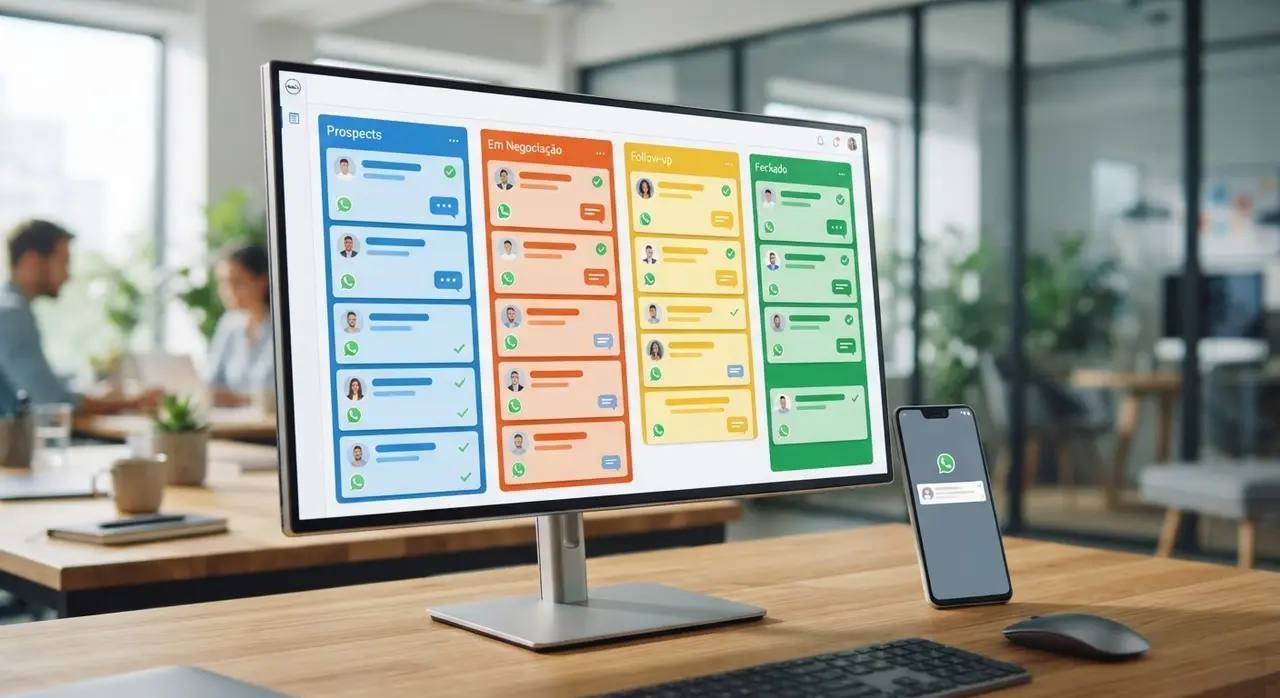
A CRM replaces the endless list of chats with a visual Kanban board. Every conversation becomes a "card" that moves from left to right as the deal progresses. This standardizes your sales process.
| Funnel Stage | Action Required | Expected Outcome |
|---|---|---|
| New Lead | Initial greeting and qualification | Determine fit and budget |
| Pitch/Proposal | Send catalog, pricing, or presentation | Client reviews the offer |
| Negotiation | Handle objections and clarify doubts | Agreement on terms |
| Closed Won | Send payment link and onboarding info | Revenue generated |
Because the funnel is shared, managers can instantly see where bottlenecks are happening. Are too many deals stuck in "Negotiation"? It might be time to review your pricing strategy or offer team training.
3. Complete Seller History and Accountability
Without integration, managers have to physically ask to see a representative's phone to review a conversation. This is inefficient and intrusive. A CRM automatically logs every message, voice note, and document sent by any agent.
If a client escalates an issue, a manager can review the exact chat history in seconds. Furthermore, if a lead is transferred from an SDR (Sales Development Rep) to an Account Executive, the new agent reads the entire context before saying hello. The customer never has to repeat themselves.
Automating the Follow-Up Process
Did you know that most sales require at least five follow-ups to close? Yet, the average salesperson gives up after two. Remembering to message a prospect three days after sending a proposal is difficult when you are juggling fifty other chats.
A solid integration allows for powerful sales automation. You can set triggers based on time or pipeline stage. For example:
- 24-Hour Check-in: If a proposal is sent and the client hasn't replied in 24 hours, the system automatically sends a friendly nudge.
- Meeting Reminders: Automated messages go out two hours before a scheduled call, reducing no-shows.
- Re-engagement: Leads marked as "Lost" can automatically receive a new promotional offer 60 days later.
By automating these repetitive tasks, your team spends less time typing administrative messages and more time actually negotiating and building relationships.
Giving Visibility to the Sales Manager
For decision-makers, data is everything. Native messaging apps provide almost zero analytical data. A CRM integration lights up the dashboard with actionable insights.

Managers can finally track essential Key Performance Indicators (KPIs) in real-time. You will know exactly how many new conversations were started today, the average response time of each agent, and the individual conversion rates of your team members.
You can identify top performers and analyze their chat transcripts to see what closing techniques work best. Then, you can use those insights to train struggling representatives, elevating the entire department's performance.
Choosing the Right Setup
To implement this successfully, you need the official API, not just the standard app. Connecting through the official API ensures your number won't be banned and allows seamless data flow to your software.
It is highly recommended to work with robust platforms and official partners like Kommo and ManyChat to ensure stability, compliance with privacy laws, and access to advanced automation features.
Conclusion
Relying on standalone smartphones and basic WhatsApp Business tags is a temporary fix, not a long-term strategy. As your lead volume grows, chaos is inevitable without the right infrastructure.
A WhatsApp CRM integration brings order to the chaos. It distributes leads fairly, tracks every interaction, automates tedious follow-ups, and provides managers with the data they need to scale revenue predictably. By treating your messaging channels with the same professional rigor as your email or phone systems, you unlock a massive competitive advantage.
If you want to see practical applications of this technology across different industries, check out our AI use cases in customer service and sales.
Frequently Asked Questions
What is a WhatsApp CRM integration?
It is a software connection that links your WhatsApp Business API to a Customer Relationship Management (CRM) platform. This allows multiple agents to answer chats from a single number, organizes conversations into a sales funnel, and tracks customer data automatically.
Can my whole sales team use the same WhatsApp number?
Yes. By using the official API connected to a CRM, your entire team can log in from their respective computers and handle chats simultaneously using one centralized, official business number.
Do I lose my chat history when integrating a CRM?
If you are migrating from a standard app to the API, existing chats typically do not transfer over to the new system automatically. However, from the moment the integration is live, the CRM will securely back up and log 100% of your future conversations and customer history.
How does it help with follow-ups?
The integration allows you to create automated workflows. You can program the system to automatically send a message if a lead hasn't responded in 48 hours, or send automated reminders for meetings and expiring quotes, ensuring no opportunity is forgotten.