
What is n8n? Connect Your Multi-Quoter, CRM & WhatsApp
Wondering what is n8n? Discover how to connect your multi-quoter, CRM, and WhatsApp into a single automated flow for seamless quoting and customer service.
- n8n
- WhatsApp Automation
- System Integration
- Multi-Quoter
- AI Agents

The Hidden Cost of Disconnected Systems
Insurance brokers, travel agencies, and sales teams all share a common enemy: manual data entry. You pull a quote from your multi-quoter system, copy the details, open your CRM, paste the data, and then manually type out a message to send to the client via WhatsApp.
This fragmented process is not just slow; it is a breeding ground for human error. Every minute your team spends copying and pasting policy numbers or pricing options is a minute stolen from actual selling and relationship building.
If you are looking to scale your operations without abandoning the legacy systems you already use, you might be asking yourself what is n8n and how it can solve this chaos. The answer lies in intelligent, node-based automation.
What is n8n? The Engine Behind True Automation
For those wondering exactly what is n8n, think of it as a digital traffic controller for your business software. It is a powerful workflow automation tool that allows different systems—like your multi-quoter, your CRM, and WhatsApp—to talk to each other seamlessly.
Unlike rigid, pre-packaged software, n8n uses a visual node architecture. This means you can design exact data paths tailored to your company's unique processes. You do not have to change the systems you already use; you simply bridge them together.
When combined with intelligent AI solutions, n8n transforms from a simple data mover into a smart assistant capable of interpreting quotes, updating records, and chatting with clients in real-time.
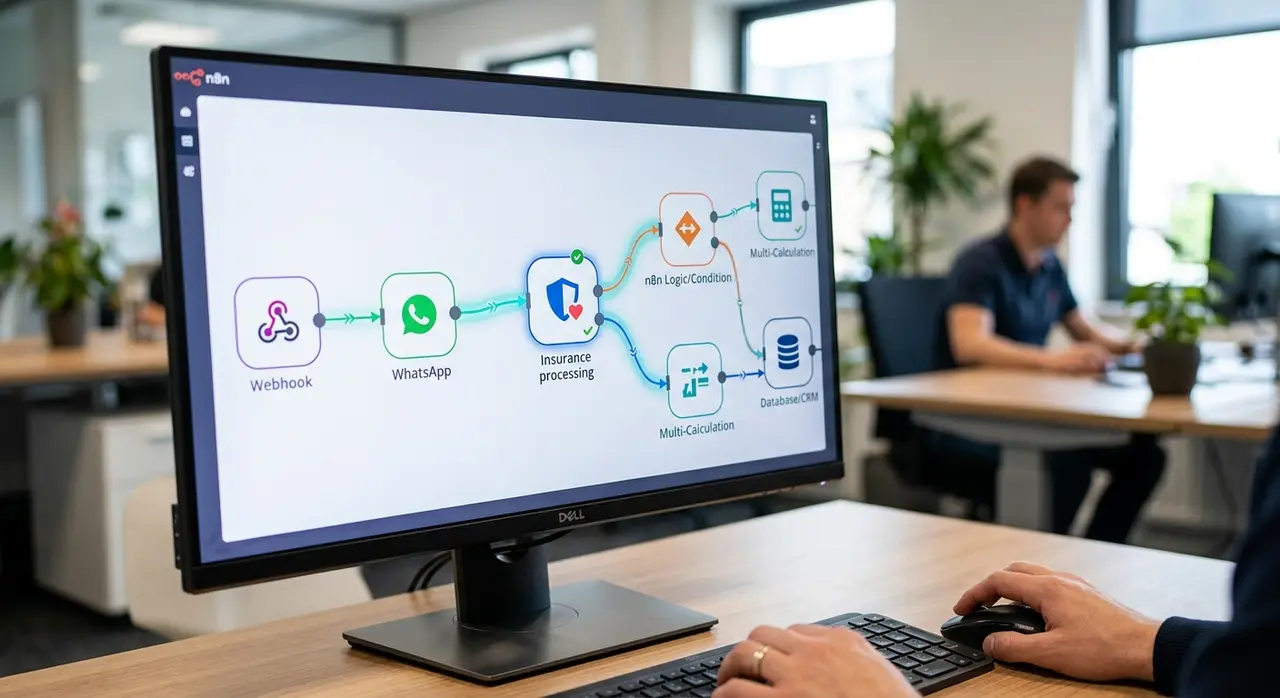
How n8n Connects Your Multi-Quoter, System, and WhatsApp
Integrating a multi-quoter (multicálculo) with WhatsApp requires a reliable data flow. Here is how n8n orchestrates this process without requiring a single line of manual typing from your team.
1. The Trigger Node: Capturing the Quote
Every automated flow starts with a trigger. When a broker generates a new quote in the multi-quoter system, the system sends a webhook—a digital notification—directly to n8n.
This trigger node instantly captures all the raw data: customer name, coverage limits, deductibles, and premium prices. The moment the quote is generated, n8n is already holding the information, ready to act.
2. The Processing Nodes: Data Treatment
Raw data from a multi-quoter is often messy. It usually arrives as a complex JSON file full of technical codes that a customer would never understand. This is where n8n's processing nodes shine.
- Parsing the Data: n8n extracts only the relevant fields, like the top three pricing options.
- Formatting: It converts raw numbers into localized currency formats and translates system codes into plain English.
- AI Integration: By routing this data through an AI agent, the technical specs are rewritten into a friendly, persuasive sales pitch.
3. The Action Nodes: CRM Update and WhatsApp Delivery
Once the data is clean and formatted, n8n splits the workflow. One action node sends the structured data straight into your CRM, updating the client's profile and logging the quote.
Simultaneously, another action node connects to the WhatsApp Business API. It sends the perfectly formatted, AI-generated quote directly to the customer's WhatsApp, completely bypassing human intervention.
The Value of Integrated Quoting and Customer Service
Imagine a scenario where a client requests an auto insurance quote via WhatsApp. Without automation, a human agent must read the message, log into the multi-quoter, run the data, download the PDF, and send it back. This takes hours.
With n8n connecting your systems, the flow is instant. The client texts your WhatsApp AI agent. The agent collects the necessary details (like car model and year) and sends an API request through n8n to the multi-quoter.
The system generates the quote, n8n processes the results, and the AI agent replies to the client with the three best options—all in under two minutes. This speed drastically increases conversion rates.
Manual vs. n8n Automated Flow
To truly understand the impact of this architecture, let's compare the traditional approach with an n8n-powered workflow.
| Process Stage | Manual Approach | n8n Automated Flow |
|---|---|---|
| Data Entry | Typing customer info into multiple platforms | Data flows via API instantly |
| Quote Generation | Waiting for the system, downloading PDFs | Trigger node captures webhook automatically |
| Data Treatment | Copy-pasting and manually formatting text | Processing nodes clean and structure JSON data |
| Customer Delivery | Typing WhatsApp messages manually | Action node sends AI-formatted message instantly |
The difference is clear. Automation removes the friction, allowing your team to handle ten times the volume of inquiries without compromising quality.
Achieving Continuous Improvement in Your Workflows
One of the greatest advantages of using n8n is the ability to monitor and iterate. Automation is not a "set it and forget it" process. It requires ongoing optimization.
Because every step of the customer journey is mapped out in visual nodes, you can easily identify bottlenecks. If quotes are taking too long to generate, you can inspect the specific node causing the delay.
This transparent architecture fosters continuous improvement. You can easily add new steps to the flow—such as sending a follow-up WhatsApp message 24 hours after the quote is delivered, or routing complex queries to a human agent.

Scaling Operations Without Changing Your Systems
Many business owners hesitate to automate because they fear they will have to rip out their expensive legacy software. The beauty of n8n is that it works as a middleware layer.
You keep your trusted multi-quoter. You keep your current CRM. You just use n8n to build the bridges between them. This approach drastically reduces implementation time and training costs.
By exploring different use cases, you will see that from insurance policies to travel packages, any business relying on structured data can benefit from this seamless connectivity.
Conclusion: The Future of Frictionless Customer Experience
Understanding what is n8n is the first step toward modernizing your business. It is the invisible force that connects your multi-quoter, your CRM, and your customer-facing channels like WhatsApp.
By automating the extraction, treatment, and delivery of data, you eliminate manual typing, reduce errors, and provide lightning-fast responses to your clients. Your team is freed from robotic tasks, allowing them to focus on closing deals and providing empathetic support.
Embrace node-based automation and commit to continuous improvement. The companies that connect their systems today will be the market leaders of tomorrow.
Frequently Asked Questions
What is n8n and how does it differ from other automation tools?
n8n is a powerful, node-based workflow automation tool. Unlike simpler platforms, n8n offers deep API integration, allowing complex data treatment (like JSON parsing) and custom logic. This makes it ideal for connecting specialized systems like insurance multi-quoters directly to WhatsApp.
Do I need to replace my current CRM or multi-quoter to use n8n?
No. One of the main benefits of n8n is that it acts as a bridge between your existing legacy systems. As long as your multi-quoter and CRM have API or webhook capabilities, n8n can connect them without requiring you to change your core software.
How does n8n handle the data from a multi-quoter?
When a quote is generated, the multi-quoter sends raw data to n8n via a webhook. n8n's processing nodes then extract the relevant pricing and policy details, format them into readable text, and send them to an AI agent to craft a personalized WhatsApp message.
Is it safe to send policy and quote data through n8n to WhatsApp?
Yes. n8n processes data securely through encrypted API connections. When properly configured, the data flows directly from your system to the WhatsApp Business API, ensuring that customer information remains private and compliant with data protection regulations.